
How to Redeem RE:Heads, Please! Codes
Shop cart on the left, codes box at the bottom, Redeem once per string.
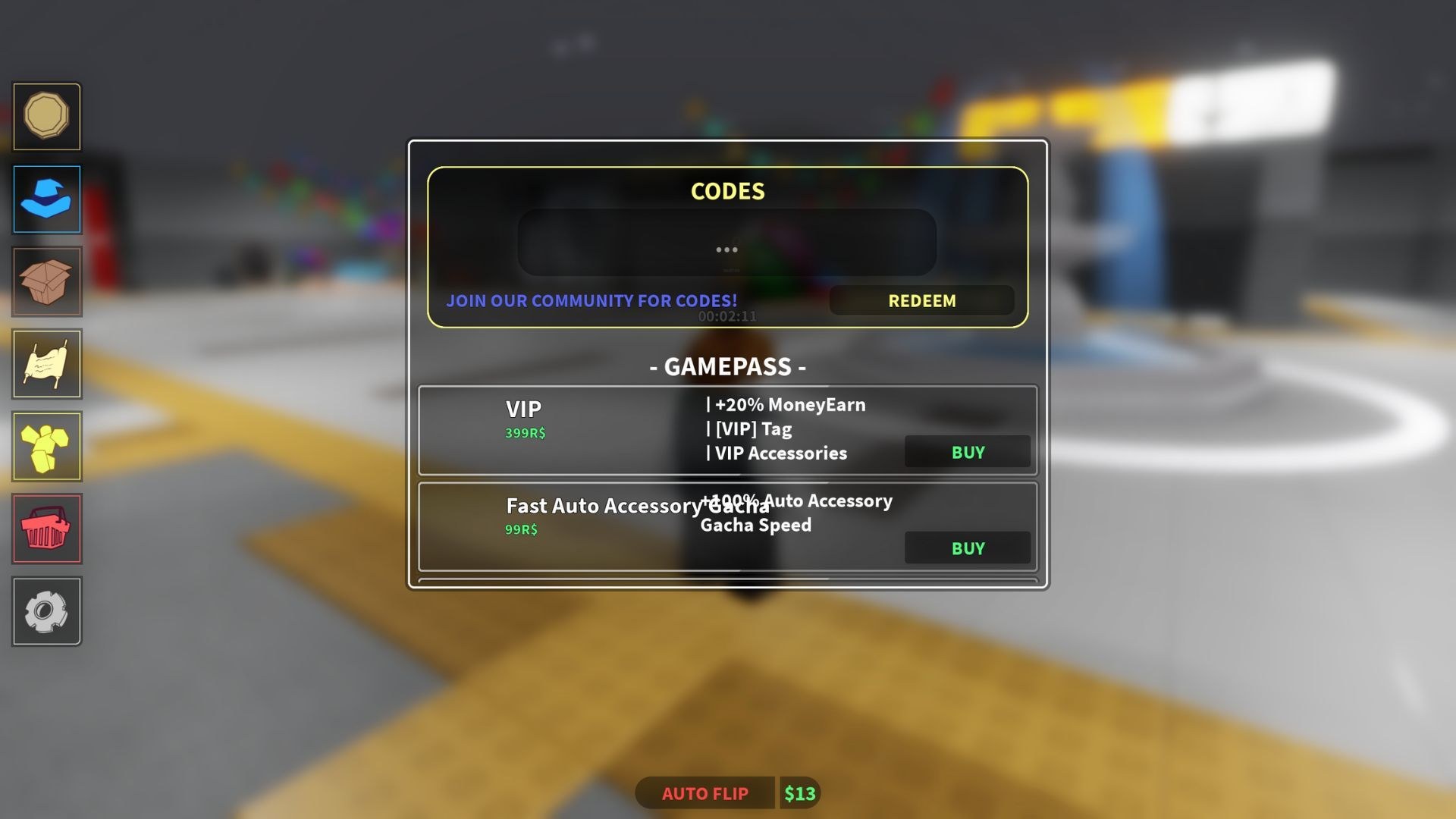
Redeeming RE:Heads, Please! codes takes under a minute once you know the shop lives on the left. The reboot launched on 18 July 2026, stays in open beta, and runs on shared 20-player servers, but the codes UI is the same on every server: cart icon, bottom text box, Redeem button. Players who still search “Heads, Please codes” often open the older COS.Studio place and hunt a right-side Code tab that does not exist here. This page is only for RE:Heads, Please! by RE:COS.Studio.
Grab the live strings from the codes list first. Then follow the platform that matches your device. Do not type from memory. ThankyouFor3kCCU and the expired thx3kccu look related and are not interchangeable.
Before you open the shop
Launch the Roblox place and wait until cash, Auto Flip, and the left cart finish drawing. Redeeming during the first load can swallow a paste or return a generic fail. You do not need VIP, Fast Auto Accessory Gacha, or a skateboard. Codes are account-bound: one successful redeem per string per Roblox account, not per server. If a friend already claimed Update2.5 on this account, you will not get a second stack.
Turn off any third-party auto-clicker while you paste. Auto Flip on the HUD is fine; it only tosses the equipped coin. A script that spams UI buttons can click Redeem on an empty box. Keep the controls guide handy if you need Q/R skate binds after you claim.
PC steps
- Join RE:Heads, Please! from the official Roblox page and wait for Pancake Station to appear.
- Look at the left edge of the HUD. Click the shop cart — not settings, not the Auto Flip toggle, not a right-side tab.
- Scroll the shop panel all the way down. Gamepasses (VIP 399 Robux, Fast Auto Accessory Gacha 99 Robux) sit above the codes box.
- Click the field labeled like “Enter code here…”.
- Paste one string from the working list. Do not add spaces before or after.
- Click Redeem. A success toast should list Enchant Books, Accessory Tickets, Engraving Scrolls, or drinks.
- Clear the box and paste the next code. Repeat until the table is empty.
If the cart does not open, press Esc to release the mouse, then click again. Full-screen Roblox on a ultrawide can push the left HUD toward the bezel; drag the window or lower UI scale if the cart is clipped.
Mobile and tablet steps
- Open Roblox, search RE:Heads, Please!, and confirm the title includes the heart 2.5 branding, not the older Heads, Please! thumbnail.
- After spawn, tap the cart on the left. On phones the cart is a small icon; it is easy to hit the Auto Flip control instead.
- Drag the shop list upward until the codes box and Redeem button sit above the keyboard safe area.
- Tap the box, paste from your notes app, and tap Redeem. On-screen keyboards love to insert a trailing space — delete it.
- Repeat for every live code. Landscape mode makes the bottom box easier to see on small screens.
Touch flip still works while the shop is open, so you may accidentally toss the Penny. That does not cancel a redeem. If the keyboard covers Redeem, close the keyboard, tap Redeem, then reopen the box for the next paste.
Case, spacing, and copy hygiene
Treat codes as case-sensitive even if a redeem sometimes succeeds in another casing. The live list mixes ThankyouFor (3k/4k/5k) with the expired ThankYouFor1kCCU. That single capital Y is enough to send you to a dead string. Update2.5 includes a digit and a dot. hotfixeshotfixes is lowercase. WeAreBack and dataloadingissues keep their published casing.
Copy from the wiki table rather than a screenshot. Discord messages wrap on mobile and can insert a newline in the middle of ThankyouFor5kCCU. If Redeem returns invalid, paste into a notes app, delete spaces and line breaks, then paste once.
Why codes fail
Expired. CCU thank-you codes die when the next milestone ships. Trinity, ThankYouFor1kCCU, sorryforlagging, 2kCCU, floodedarea, and thx3kccu are already gone. Check expired codes before you assume the UI is broken.
Wrong game. The older Heads, Please! by COS.Studio still has its own codes. Those strings, and any guide that says “tap Code on the right,” belong to that place. Confirm you are in the RE:COS.Studio experience.
Already redeemed. Success is once per account. Alts are separate Roblox accounts, not extra redeems on the same login.
Typo or extra character. A trailing space, a missing 2.5 dot, or ThankYou instead of Thankyou fails. Paste, do not retype.
Beta hitch. The place is still in open beta. During data-load incidents the studio has issued apology codes such as dataloadingissues and hotfixeshotfixes. If Redeem does nothing, rejoin a fresh 20-player server and try once more. Do not spam the button; wait for the toast.
Shop not fully open. If you click Redeem while the cart is animating, the box can still be empty. Open the cart, wait a beat, then paste.
After a successful redeem
Books, tickets, scrolls, and drinks land in your inventory, not as extra cash on the HUD. Enchant Books go to the enchanting flow: one enchant per coin, so park them until the Fountain on Pancake Station floor 1 gives a coin you will keep. Accessory Tickets feed the accessory gacha described on accessories. Engraving Scrolls arrived with Update 2.5; read the in-game tooltip before you spend a scarce scroll. Luck Sodas, Wealth Sodas, and Energy Drinks are timed — pop them while you are actually flipping a high-profit coin.
Then return to the normal loop: flip for money, roll better coins, skate with Q/R, and visit Another Station. Codes do not replace getting started. They only fill the bag you take into that loop.
New strings usually appear on Discord and the group wall after CCU spikes or hotfixes. When a code dies, it moves to the expired page; it is not a redeem bug.
Frequently Asked Questions
Quick answers for coin flips, codes, and stations.
Is the codes box on the left or the right?
Left. Open the shop cart on the left and scroll to the bottom. A right-side Code button is the older Heads, Please! UI. Full clicks are in the PC and mobile sections above, and the live strings sit on the codes list.
Do I need VIP to redeem RE:Heads, Please! codes?
No. VIP (399 Robux) only adds +20% MoneyEarn, a VIP Tag, and VIP Accessories. Codes redeem on a free account from the same left shop.
Are the codes case-sensitive?
Type them exactly as published. ThankyouFor3kCCU is live; ThankYouFor1kCCU is expired. Mixed case is a common fail. Copy from the codes hub instead of guessing.
I pressed Redeem and nothing happened. What now?
Rejoin, wait for the HUD, open the left cart fully, and paste again with no spaces. If the string is on expired codes, it will never succeed. Beta data-load issues sometimes need a fresh server.
Can I redeem the same code on two devices?
Only if they are different Roblox accounts. One account gets each code once, whether you claimed it on PC or mobile. Alts are separate logins, not extra redeems.
Where do the items go after Redeem?
Into inventory: books for enchanting, tickets for accessories, scrolls and drinks as consumables. Cash on the HUD does not jump from a code redeem.